

Protect apps with Cloudflare Access
Put an installed app behind a Cloudflare sign-in so only Appflare's users reach it, at install or later.
Many apps have no sign-in of their own, or one you would rather not expose to the internet. Appflare can put any app it installs behind Cloudflare Access: before anyone reaches the app, Access asks them to sign in, and lets in only the people who use this Appflare. You can turn it on in the install form or later on the app's page.
This is separate from protecting the manager itself, which lets in only admins. Each can be on without the other.
What it does
For each protected app, Appflare creates a self-hosted Access application named "Appflare: ()" in your Zero Trust organization. It covers every address the app has, signs people in for 24 hours, and is not shown in the App Launcher. It lets in two things:
- the "Appflare users" policy, shared by every app Appflare protects;
- a service token of the app's own, for Appflare's health checks.
The app itself does not change. It receives only requests that got past Access.
Who gets in
Every Appflare user, admins and members alike. There is no list per app. Adding a user in Settings > Users and sign-in lets them into every protected app, and deleting one keeps them out. Appflare keeps the "Appflare users" policy in step on each change; if an update fails, Appflare says so and tries again within 30 minutes.
The install form and the app's page say how many people that is.
How people sign in
Access asks for a sign-in before the app loads, with one of your Zero Trust organization's login methods. The install form lists them. Each person must be able to sign in with the email of their Appflare account through one of those methods, or Access keeps them out.
A new Zero Trust organization often has only the Cloudflare account login method, which admits members of this Cloudflare account with their Cloudflare login email. To let anyone with an Appflare account in, add One-time PIN as a login method in the Zero Trust dashboard: Access then emails a code to whoever signs in, and lets them in when their email is on the policy.
Public paths
Some apps serve pages that people without an account must reach, such as share links or a webhook another service calls. Their catalog entry can list those paths, and they stay public while the app is protected. The install form shows them as Stays public: /s/*, /api/webhook, and the app's page lists them under Public paths.
An app whose entry lists none is protected whole: everything at its addresses asks for a sign-in, links you share with others included. Someone you send a link to must then have an Appflare account.
Public paths apply on the app's workers.dev address and its domains, never on its
version previews. Appflare keeps them in a second Access application, "Appflare:
() public paths", with a bypass policy for everyone.
Apps that require or recommend it
A catalog entry can say how its app goes with Access:
- Required. The app has no sign-in of its own, or relies on Access's. It installs only protected, the install form shows the checkbox ticked and fixed, and its page offers no way to turn protection off. Uninstall the app instead.
- Recommended. The install form's checkbox starts ticked. You can untick it.
- Neither: the checkbox starts unticked.
An app that requires Access lists Cloudflare Access among its requirements, and installs only once the account has what it needs. An app that can use Access without requiring it, such as one that reads Access's sign-in once it is protected, may list it too: its catalog page then says Access is needed only if you protect the app, and it installs unprotected on any account. The account is checked only when you tick the checkbox.
The catalog can change how an app goes with Access after it is released, without a new version: the install form and the app's page then show the new choice. For an app that is already protected, Appflare looks for such changes every 30 minutes, seven protected apps a run; opening the app's page picks a change up at once.
- A public path the catalog drops stops being public on its own, in the same run.
- A public path the catalog adds stays behind the sign-in until an admin agrees. The app's Cloudflare Access card says The catalog now lists /x/* as public., and admins get Make public; members see the line without the button. Installing the app protected, protecting it (or protecting it again), updating it and rolling it back also accept the paths its entry lists at that moment.
- Protection the catalog now requires for an app you left unprotected is never turned on for you. The card warns The catalog now says this app must run behind Cloudflare Access. with Turn on for admins, Home lists the app under Needs attention, and its updates wait until it is protected.
Turn it on at install
In the install form, under the app's address, tick Protect with Cloudflare Access.
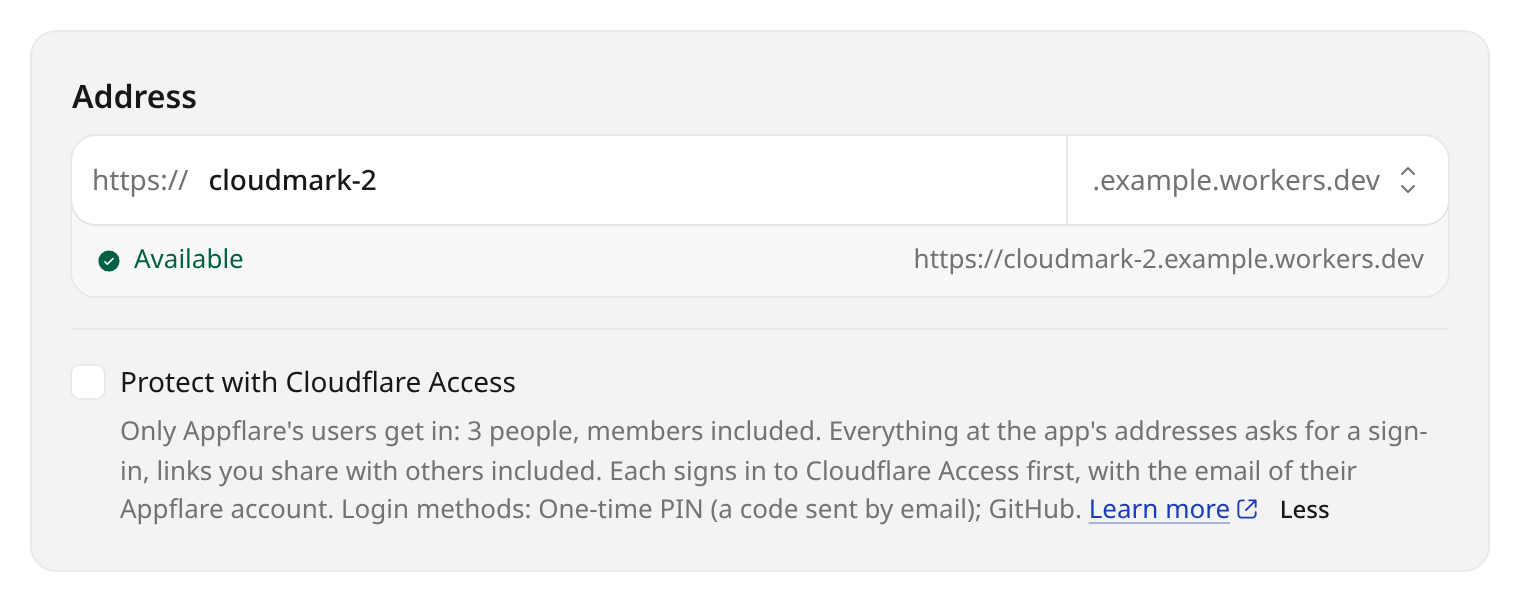
The app is protected from its first request:
Appflare creates its Access application before the app's Worker exists and covers the
Worker before any address, preview or domain goes live. If that fails, the install
fails, and the app is taken off workers.dev first.
While the account cannot protect apps, the checkbox is unticked and disabled, and the form says why, with a link to the row of What this account can run that fixes it. An app deployed by its own installer has no checkbox: its installer decides its Workers and addresses. Add an Access application for it by hand in the Zero Trust dashboard instead.
Turn it on or off later
On the app's page, open Domains and email and find Cloudflare Access. Members see whether the app is protected, who gets in, and its public paths; only admins change it.
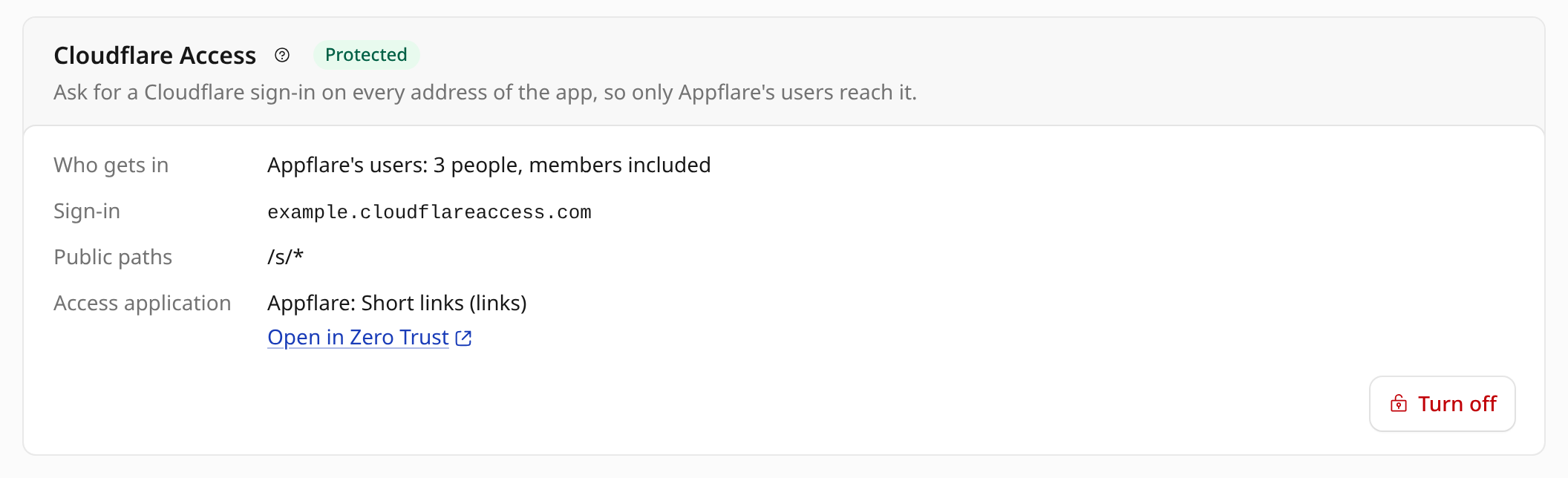
- Protect with Cloudflare Access checks the account first, then asks you to confirm. Every address of the app then asks for a sign-in.
- Turn off deletes the app's Access applications. Anyone with the app's address can then reach it, unless the app has a sign-in of its own.
- Protect again shows up only when Appflare's records show something to repair, with a line saying what: its Access application was deleted in Cloudflare, the "Appflare users" policy was made again (or is missing), the record of the app's Access application is incomplete, or its last update failed. It brings the protection back in step, and makes the Access application again if it no longer exists.
Each runs a settings change job, listed as Cloudflare Access change, whose log opens. An app that reads the Access values in its settings (to check Access's sign-in itself: the Zero Trust team domain or team name, the audience tag of its Access application, the address of the team's signing keys) is deployed again in the same job: after the protection is made when turning it on, and before it is removed when turning it off, so the app is never left trusting a sign-in that no longer comes.
The card also links to Access applications in the Zero Trust dashboard, where the app's application is listed by its name.
Addresses it covers
The Access application covers the app's Workers by their script tag, so it follows them wherever they answer. It also names each of the app's hostnames: Access picks a named hostname over a Worker or a wildcard, so the app's application decides there even when another Access application you made covers them too. It covers:
- the
workers.devaddress, - every version preview, later ones included, through the Worker. Their addresses
are named too (
*-<worker>.<your-subdomain>.workers.dev), but only while another Access application you made covers them, as that pattern also matches the address of any Worker whose name ends in-<worker>. With such a Worker in the account, the previews stay under your other application, and the job's log says which Worker keeps them there, - custom domains,
- the base and every name of a
wildcard domain, through the Worker.
They are named too (
<base>and*.<base>), but only while another Access application you made covers them.*.<base>also matches the custom domains and routes of other Workers under the base, such asapi.<base>of an unrelated Worker, and<base>matches another Worker's route on one of its paths. With such an address in the account, that part of the wildcard domain stays under your other application, and the job's log names the Worker and its address, - external domains, which reach the app through the gateway Worker and are therefore added to the application by name. A new external domain is covered before it is set up, and a removed one is taken off after it is gone.
Cloudflare allows 50 destinations on one Access application. For an app with more domains than fit, Appflare leaves out hostnames its Workers already cover, and the log names them. If an Access application made later covers one of those, Appflare names it within 30 minutes. It refuses to protect an app that needs more than 50 named, counting one per Worker, one per external domain, and one per address another Access application covers more broadly. An address another Access application names exactly is left to that application and does not count.
Adding a domain later needs nothing from you. If Appflare cannot bring the Access applications in step with a change outside a job, the app's page says so. Appflare tries again every 30 minutes, and the app's addresses stay protected meanwhile.
An app protected by an earlier version of Appflare has an Access application that covers its Workers alone. Once Appflare is updated, the 30-minute check adds the app's hostnames to it, a few apps at a time. The app stays protected as before until then.
Health checks
Appflare's health checks cannot sign in like a person. Each protected app has a service token of its own, which Appflare creates, renews before it expires, and deletes when protection comes off. Appflare sends the token only on an address where Access just asked for a sign-in; Access removes it before the request reaches the app. It is never sent to an external domain, whose DNS someone else controls: Check now on such a domain says it is live behind Cloudflare Access.
Appflare's tokens are account service tokens. If you add a rule with the Any Access Service Token selector to an Access application in the dashboard, these tokens pass it too.
What you need
- A Zero Trust organization on the account. Create one under Zero Trust in the Cloudflare dashboard if there is none; Settings > Your account > What this account can run shows it under Zero Trust.
- Three permissions on Appflare's Cloudflare token: Access: Apps and Policies (Edit), Access: Organizations, Identity Providers, and Groups (Read), and Access: Service Tokens (Edit). The token template asks for all three. An older token needs them added; Token permissions in What this account can run names any it lacks. Appflare connected with Cloudflare sign-in has all three already.
Appflare checks both before it changes anything, at install and when you turn protection on.
Cloudflare Zero Trust's Free plan covers up to 50 users. When Appflare has more, the install form and the app's page add a line saying so.
Uninstalling and removing Appflare
Uninstalling a protected app removes its public paths before any of its addresses is released, and its Access application and service token after the Worker is gone.
Remove Appflare keeps each protected app's Access application and the "Appflare users" policy, so those apps keep asking for a sign-in. It deletes the health checks' service tokens. Who can sign in is then managed under Zero Trust, Access in the Cloudflare dashboard.
Troubleshooting
You cannot sign in to an app
Check that the email of your Appflare account can sign in with one of the organization's login methods, and add One-time PIN if it cannot. The manager's own Cloudflare Access protection is separate: being kept out of an app does not lock you out of Appflare, and you can turn the app's protection off from its page. If you are kept out of the manager itself, see If you are locked out.
The Access application was deleted in the dashboard
The app's addresses no longer ask for a sign-in. Appflare checks every 30 minutes that each protected app's Access applications still exist; once it finds one gone, the app's page says so and offers Protect again, which makes a new one. This works for an app whose catalog entry requires protection too.
The "Appflare users" policy was deleted in the dashboard
Appflare checks for it every 30 minutes and makes it again when it is gone. Each protected app still names the old one, so nobody can sign in to it: its page says so, with Protect again, which points it at the new policy.
Another Access application covers the app
An Access application you made for a broader pattern, such as
*.<your-subdomain>.workers.dev or *.example.com, does not stop Appflare: the app's
own application names each of the app's addresses exactly, which Access picks over the
pattern. The job's log names the other application with a warning, and your
application keeps protecting everything else it covers. There are two exceptions,
both described above: the app's version previews next to a
Worker whose name ends like the app's, and a wildcard domain with another Worker's
custom domain or route under it. Appflare checks every 30 minutes whether the
previews and wildcard domains still need naming, so it follows such an application,
Worker, custom domain or route made or deleted later.
Appflare refuses to protect an app when an Access application you made covers one of its addresses as narrowly as Appflare's would: the same Worker, the same hostname, a path on one of its hostnames, or a single version preview. The message names that application. Delete it in the Zero Trust dashboard, or keep using it and leave Appflare's protection off for the app.
Cloudflare lets only one Access application name each hostname or pattern, so once
the app's application names an address, no other application can name exactly that
address. An application you made before it keeps the address: one for exactly the
app's workers.dev address or a custom domain, made while an earlier version of
Appflare protected the app by its Workers alone, or one that already names a domain
you add to the app later. Appflare then leaves that hostname to yours instead of
failing, and so does Protect again: the app's application keeps its Workers and
every other address, the job's log names your application in a warning, and the
app's page says so. On that hostname your application decides who gets in, and it
may refuse Appflare's health checks. Delete it, and within 30 minutes Appflare's
application covers that hostname again. A new external domain that another
application already names is refused instead, so it is never added without
Appflare's protection.