

External domains
Serve an installed app on a hostname whose DNS is managed outside your Cloudflare account, through Cloudflare for SaaS and the Appflare gateway.
A custom domain has to be in a domain on your own
Cloudflare account. An external domain is any other hostname: a customer's
domain, a domain at another registrar, or a domain in someone else's Cloudflare
account, such as notes.example.org. Its owner adds a DNS record that points at
your account; Cloudflare issues the hostname's certificate, and the app answers on
it.
External domains use Cloudflare for SaaS custom hostnames on one domain of your account, the gateway domain. You set up the gateway once, then add external domains to any app.
What you need
- One domain (a zone) on this Cloudflare account with the status Active, to be the gateway domain. The free plan is enough.
- Cloudflare for SaaS turned on for that domain (see below).
- A Cloudflare token for Appflare with these permissions. All of them are optional: Appflare works without them, and only external domains need all four.
| Permission | Access | Used for |
|---|---|---|
| Zone | Read, on all zones of the account | Listing the domains you can choose as the gateway, and telling whether a hostname belongs to one of your own domains (it is then a custom domain, which needs no gateway). |
| DNS | Edit, on the gateway domain | Adding the gateway's DNS record. |
| Workers Routes | Edit, on the gateway domain | Adding the route that sends the domain's requests to the gateway Worker. |
| SSL and Certificates | Edit, on the gateway domain | Adding and removing custom hostnames, and setting the domain's fallback origin. |
Zone, DNS and Workers Routes are the permissions custom domains use as well. The token link in setup includes all four. If the token lacks one, Appflare names it where it is needed. Open API Tokens in the Cloudflare dashboard, edit the Appflare token, add the permission, and save. An edited token keeps its value, so nothing changes in Appflare. Appflare connected with Cloudflare sign-in has all four already.
Choose the gateway domain
The gateway domain is where external domains point their CNAME. Any active domain of the account works:
- A domain of its own is the tidiest choice, for example a short domain you keep only for this.
- A domain that already serves a site works too. Every request to it passes
through the gateway Worker, which hands it to the domain's origin unchanged, so its
sites, and any Worker routes on it more specific than
*/*, keep working as before. Those requests do count toward your Workers requests (see Cost).
A domain whose requests all go to another Worker already (a */* route) cannot be
the gateway. Appflare refuses it before creating anything.
If the account has no domain yet, add one you own (the free plan is enough; it means
changing its nameservers at your registrar) or register one with Cloudflare
Registrar. Either also lets apps use custom domains. Until then, apps answer on
workers.dev.
Turn on Cloudflare for SaaS
Cloudflare for SaaS is off on every domain until a person turns it on in the dashboard. The API cannot do it.
- In Settings > Domains > External domains, choose the domain under Gateway domain. Appflare asks Cloudflare about it. While Cloudflare for SaaS is off, it says so and offers Open Custom Hostnames.
- On that page of the Cloudflare dashboard (the domain, SSL/TLS, Custom Hostnames), select Enable.
- Cloudflare asks for a payment method, even though the first 100 custom hostnames cost nothing. An account that already pays for something, such as Workers Paid or R2, has one on file.
- Back in Appflare, select Check again.
If Appflare says the token cannot manage custom hostnames on the domain, the token lacks SSL and Certificates: Edit. Add it and check again.
Set up the gateway
Once the domain is ready, admins select Set up gateway. It takes about 15 seconds. Appflare adds to the gateway domain:
- A DNS record
appflare-gateway.<gateway domain>, typeAAAA, value100::, proxied. This is an originless record: the gateway Worker answers every request to it, so the address is never contacted. External domains point their CNAME here. - The fallback origin for the domain's custom hostnames, set to that record, unless the domain has one already; Cloudflare needs one before custom hostnames go active. An existing fallback origin is left as it is.
- The Worker
appflare-gateway, with a KV namespaceappflare-gateway-routesas its routing table (hostname to app). - A route
*/*on the domain, to that Worker. Cloudflare for SaaS needs a route that matches every request: a route for a single hostname stops matching when the owner's CNAME is proxied from another Cloudflare account.
The gateway Worker looks at each request's hostname:
- A name in the gateway domain passes through to the domain's origin, unchanged.
appflare-gateway.<gateway domain>itself answers with a short JSON note,{"service":"appflare-gateway", ...}, which Appflare uses to check that the gateway is live. - An external domain in the routing table goes to its app's Worker over a service
binding, with the original URL and
Host. - Any other hostname passes through to the origin too, so a custom hostname you added outside Appflare keeps working.
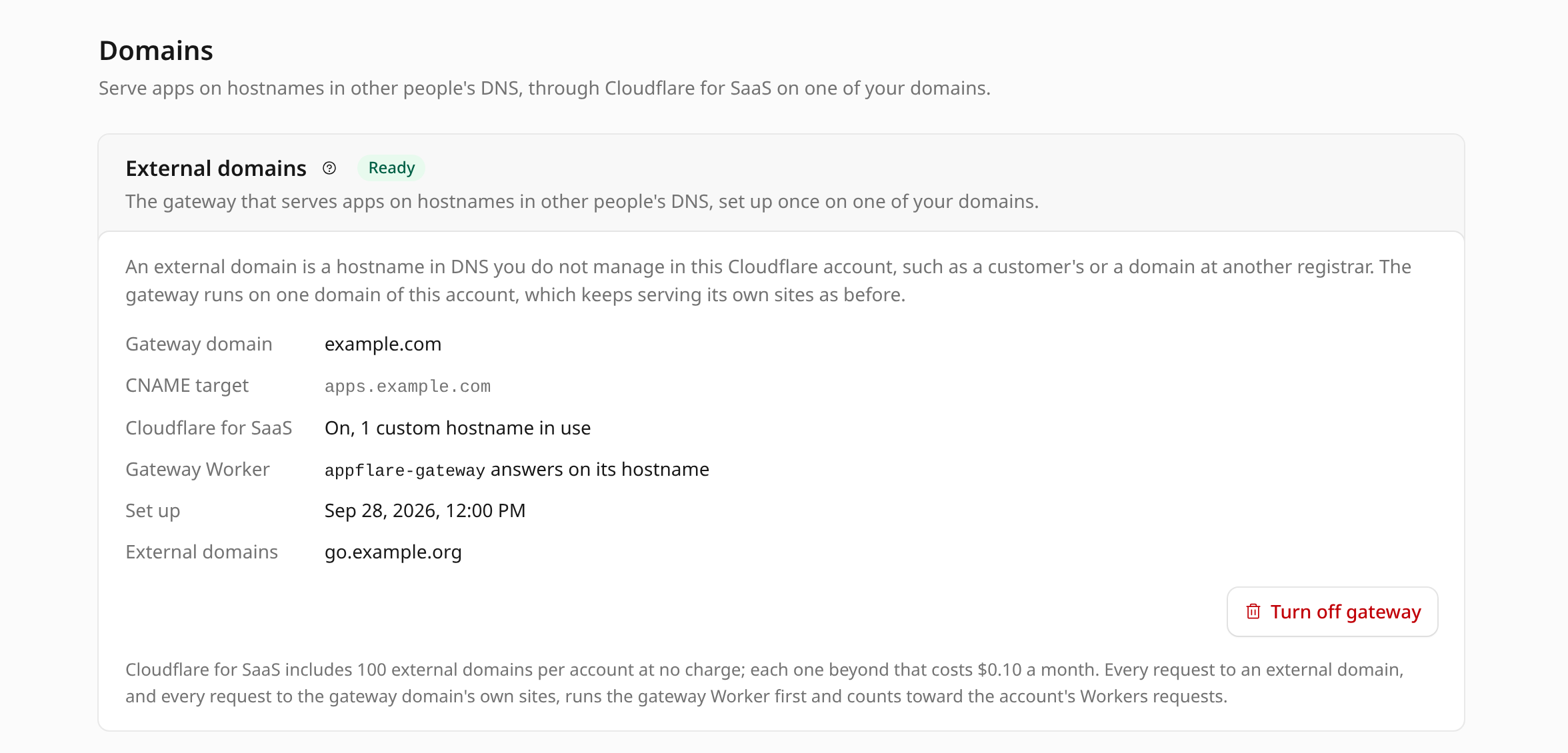
Settings > Domains > External domains then shows the gateway domain, the CNAME target, whether Cloudflare for SaaS is on and how many custom hostnames are in use, whether the gateway Worker answers, and the external domains it serves. If setting up stopped part way, Finish setup continues where it stopped without creating anything twice.
Add a domain to an app
On the app's Domains and email tab, admins select Add external domain. The button shows once the gateway is ready; until then the tab links to the gateway's setup instead. The install form offers the same under Address: pick Another domain, managed elsewhere at the right of the field and type the whole hostname. The install adds the domain once the app runs.
- Enter the hostname: one exact name, such as
app.example.org. Appflare stores it in lower case, and an international name in its Punycode form. - Choose how the owner proves the name:
- CNAME, for a name that serves nothing yet. The owner adds one CNAME record, and the domain is live a minute or two later.
- TXT records first, for a name that already serves a site. The owner adds TXT records; Cloudflare validates the name and issues its certificate while the name keeps serving what it serves now; the owner changes the CNAME last. Nothing goes down.
- Select Add domain.
Appflare refuses:
- a wildcard (
*.example.org): Cloudflare offers wildcard custom hostnames on the Enterprise plan only; - the gateway domain or a name under it;
- a name under another domain of this account: add it as a custom domain instead;
- a name that is already a domain of another app. Each hostname belongs to one app; an app can have several external domains;
- a name that is already a custom hostname made outside Appflare, on the gateway domain or on another Cloudflare for SaaS domain. Delete it there first.
A whole domain (an apex such as example.org) is allowed, with a warning: its DNS
host must support a CNAME at the apex (CNAME flattening or ALIAS), and many do not.
The records the owner adds
The domain's card on the app's page lists the records to add, with copy buttons, taken from Cloudflare's answer. With CNAME, one record:
| Type | Name | Value |
|---|---|---|
CNAME | app.example.org | appflare-gateway.<gateway domain> |
DNS only is recommended. A proxied record from another Cloudflare account works too: that account's settings for the name run first, and the gateway serves the request after them.
With TXT records first, top to bottom:
| Type | Name | Value |
|---|---|---|
TXT | _cf-custom-hostname.app.example.org | A value from Cloudflare. Proves the name is the owner's before any traffic moves. |
TXT | _acme-challenge.app.example.org | Values from Cloudflare, usually two records. They let the certificate be issued before any traffic moves. |
CNAME | app.example.org | appflare-gateway.<gateway domain>. Change it once the domain shows Active. |
How long it takes
Typical timings, measured with DNS-only records:
- CNAME added after the domain: live about 1.5 minutes after the CNAME is in place.
- CNAME already in place when the domain is added: the name validates within seconds, and the certificate follows within 2 minutes.
- TXT records first: ready about 1 minute after the TXT records are in place, before any CNAME.
The owner's DNS host may take longer to publish a record. The install job waits about two minutes for the domain to go active. If the records are not there yet, its log lists them and the install finishes anyway. A domain that cannot be added never fails the install: the log says why, and you add the domain later on the app's page.
Pending states
The domain's card shows Cloudflare's state, read again every 10 seconds while the page is open. Check now reads it at once. While the page is closed, the scheduled run reads every external domain every 30 minutes, and a notification channel can tell you when one goes active or fails.
| Badge | Meaning |
|---|---|
| Waiting for DNS records | Cloudflare has not validated the hostname yet. The card lists the records and what Cloudflare says, such as "custom hostname does not CNAME to this zone." |
| Issuing certificate | The hostname is validated; the certificate is on its way. |
| Active | Hostname and certificate are active. Appflare sends one request to the app through the domain and shows the answer. |
| Missing at Cloudflare | Cloudflare has no custom hostname for it any more, for example after it was deleted in the dashboard. Remove it and add it again. |
| blocked, moved, deleted, pending deletion | Cloudflare's own state for a hostname that will not serve. |
| certificate validation timed out, certificate issuance timed out, certificate expired, ... | Cloudflare gave up on the domain's certificate, usually because the records were not in place in time. Remove the domain and add it again once they are. |
What visitors see meanwhile
- The name does not resolve: the owner has not added the CNAME yet.
- Error 1016: the CNAME points at the gateway, but the hostname is not added in Appflare yet.
- A certificate warning, or error 522 over plain HTTP: the hostname is validated and the certificate is still being issued, for a minute or two. A name in a domain on Cloudflare may already load in that window, on its own domain's certificate.
- Error 1014: the hostname was removed from Appflare while the CNAME still points at the gateway.
- A 502 page from the gateway: the gateway could not read its routing table, or does not reach the app yet. Try again shortly.
Once the domain is active it counts as one of the app's addresses, like a custom domain: when the app first answers on it, Appflare turns the workers.dev URL off, and health checks and Open app then use the domain.
Remove a domain
Select Remove next to the domain, then Remove domain. Appflare deletes the
custom hostname and its routing entry. Cloudflare stops serving the app on it at
once, and visitors get error 1014 until the owner points the name elsewhere; the
owner can then delete the records they added. Removing an app's last external domain
also removes the gateway's service binding to its Worker. Removing the app's last
working domain while its workers.dev URL is off turns that URL back on first, or is
refused when an admin turned it off with the switch; see
the workers.dev URL.
Uninstalling an app removes its external domains, then the gateway's binding to its Worker, before its custom domains and the Worker itself. If the token no longer has SSL and Certificates: Edit, the uninstall stops and says so; add the permission and select Retry uninstall.
Turn off the gateway
Turn off gateway in Settings > Domains > External domains is refused while any app has an
external domain; remove those first. It then removes the route, the Worker
appflare-gateway and its routing table, and the DNS record and fallback origin if
Appflare added them. The gateway domain's own sites keep working without it.
Cloudflare for SaaS stays on for the domain. With no custom hostnames it costs nothing; turn it off in the dashboard if you like. To move the gateway to another domain, turn it off and set it up again there.
Cost
- Custom hostnames. Cloudflare for SaaS includes 100 per account at no charge on the Free, Pro and Business plans; each one beyond that costs $0.10 a month. See Cloudflare's plans.
- Worker requests. Every request to an external domain, and every request to the gateway domain's own sites, runs the gateway Worker first and counts toward the account's Workers requests, including the daily limit on Workers Free. Cloudflare does not bill the hop from the gateway to the app over a service binding as a second request; the CPU time of both Workers counts. A gateway domain that serves a busy site adds that site's traffic to your Workers requests, which is one more reason to give the gateway a domain of its own.