

Custom domains
Serve an installed app on a hostname in one of your own domains.
Every app gets a workers.dev URL. You can also serve it on a hostname in a domain
you have on Cloudflare, such as notes.example.com. Cloudflare creates the DNS record
and the certificate. Once the app answers on the domain, Appflare turns the
workers.dev URL off, so the domain is the app's one address. You can
turn it back on at any time.
For a hostname whose DNS is managed somewhere else, see Domains held outside this account.
Appflare itself can have a domain too: see Give Appflare its own address.
What you need
- A domain (a zone) on this Cloudflare account, with the status Active.
- A Cloudflare token for Appflare with three more permissions: Zone: Read, DNS: Edit, and Workers Routes: Edit, for the domains you want to use. The token link in setup includes them. Appflare works without them; only custom domains (and wildcard domains) need them.
If the token lacks them, the Add domain dialog says which ones. Open API Tokens in the Cloudflare dashboard, edit the Appflare token, add the permissions for your domains, and save. An edited token keeps its value, so nothing changes in Appflare. You can also create a new token and replace the old one with Change how Appflare connects under Settings > Your account > Cloudflare connection.
Appflare connected with Cloudflare sign-in has these permissions already.
Add a domain
On the app's Domains and email tab, admins find Custom domains and select Add domain. The install form offers the same: pick the domain at the right of the Address field and type the name before it. The install adds the domain once the app runs. The form warns when the name already has DNS records: the install does not replace them, so add the domain here afterwards if you want them replaced.
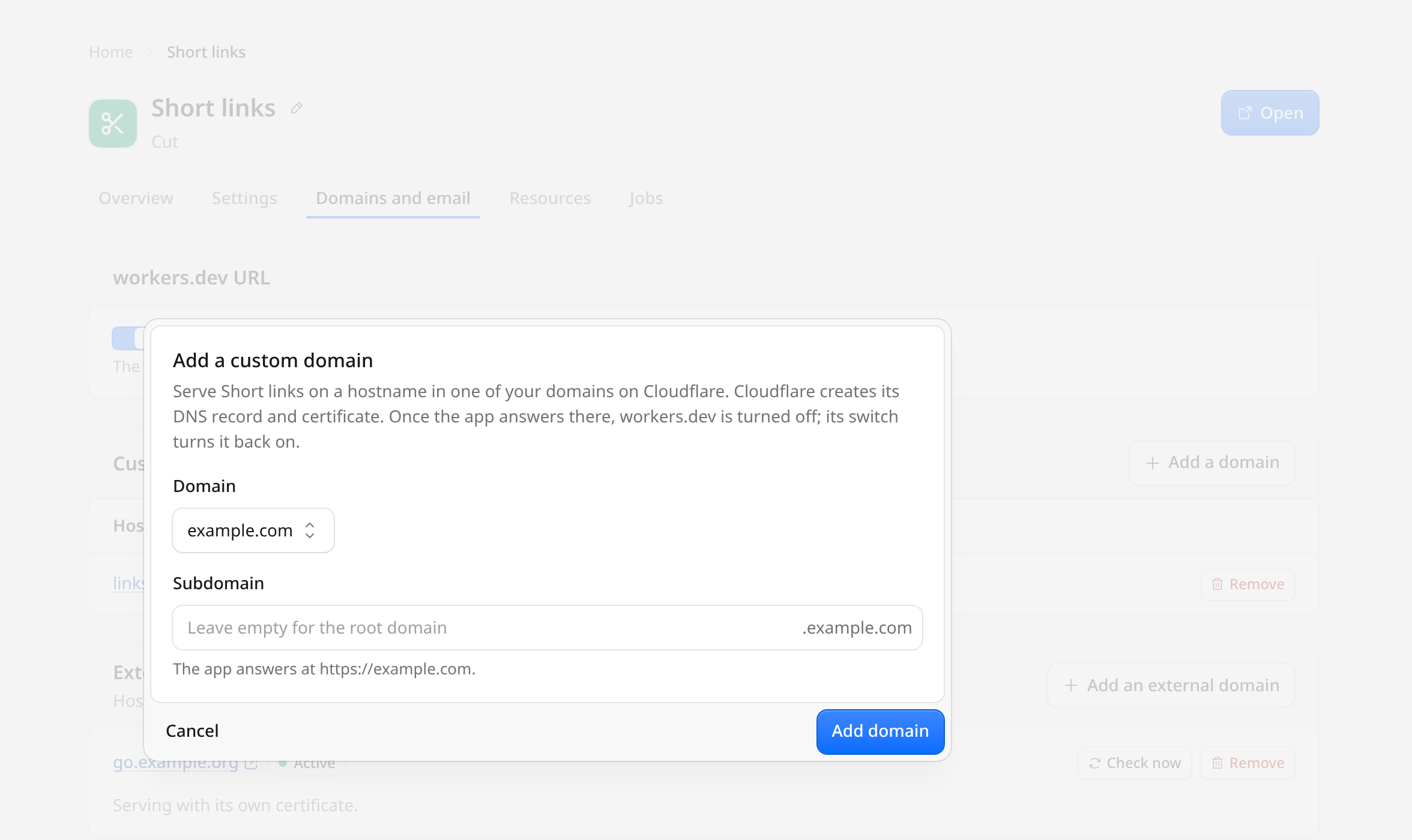
- Choose the domain. Only active domains are listed.
- Enter the hostname: the domain itself or a name under it. Wildcards are not allowed; a custom domain matches one exact hostname.
- Select Add domain.
If the hostname already has DNS records (for example an A or CNAME record that
points at another server), Appflare shows them and adds nothing. Tick Replace the
existing DNS records to let Cloudflare replace them with the app's record; whatever
they pointed to then stops receiving traffic for that hostname.
A hostname that already serves another Worker is refused. Remove it from that Worker first.
The app's page lists the new hostname next to the workers.dev URL. It can take a
few minutes before the DNS record and certificate are live; Check now next to the
domain sends one request to it.
Remove a domain
Select Remove next to the domain. The app stops answering on that hostname.
If it is the app's last working domain and the workers.dev URL is off, see
below. Uninstalling an app removes all of its custom
domains first.
Wildcard domains
Some apps need every name under one hostname rather than one exact hostname. A
tunnel, for example, gives each session an address of its own, such as
https://a1b2c3.tunnels.example.com. For these apps the section is called
Wildcard domain, and the install form's Address lists your domains as
wildcard bases instead of custom domains. The dialog says why the app needs it.
- Choose the domain and enter the hostname the app gets, such as
tunnelsfortunnels.example.com. The app answers on that hostname and on every name under it (*.tunnels.example.com). - Select Add wildcard domain.
A custom domain matches one exact hostname and cannot be a wildcard, so Appflare serves the name with Workers routes instead. In the domain's zone it adds:
- two proxied DNS records,
tunnels.example.comand*.tunnels.example.com, each anAAAArecord to100::with the commentAppflare: serves the Worker <name>; - two Workers routes to the app's Worker,
tunnels.example.com/*and*.tunnels.example.com/*.
The app page shows the domain as *.tunnels.example.com and lists the records and
routes with the app's resources. Updates and settings changes keep them. Check
now and the health check send their request to tunnels.example.com. Once the app
answers there, the workers.dev URL is turned off, as with any custom domain.
Remove deletes the routes, then the records; uninstalling the app does the same
before it deletes the Worker. An app has at most one wildcard domain.
An app whose settings use {{wildcardHostname}} (for example a tunnel's
TUNNEL_DOMAIN) gets the hostname in them: empty until a wildcard domain is
assigned, then tunnels.example.com. Adding or removing the wildcard domain on the
app page starts a settings change that deploys the app's settings again with the new
value, and opens its log. If another job of the app is running, Appflare says so
instead; save the app's settings once it is done.
Appflare adds nothing and says why when a name already has A, AAAA or CNAME
records of its own, when a route for either pattern sends requests to another
Worker, or when the hostname is another Worker's custom domain. It also refuses a
hostname with names under it that already go through Cloudflare's proxy, such as
api.tunnels.example.com, because the app would take them over; the message names
them. Names that are another app's custom domain, or that a more specific Workers
route already serves, stay as they are and do not count. Delete those in the Cloudflare dashboard (or turn off their proxy), or choose
another name. If you agreed to serve a whole domain, its existing names are part of
that agreement.
If Cloudflare stops Appflare part way through, for example because the token lacks Workers Routes: Edit, Appflare removes the records and routes it had already added and says so, so you can fix the reason and add the domain again. When the reason may pass by itself, such as a short Cloudflare outage, the install tries again on its own. A route to the app's Worker that you made yourself is used as it is and stays when the wildcard domain is removed.
When the install form asked for a wildcard domain that could not be set up, the
install still finishes, and Appflare deploys the app's settings again so that
{{wildcardHostname}} does not name a hostname the app does not have.
Certificates
Cloudflare's free certificate for a domain covers the domain and the names one level
under it: example.com and *.example.com. With tunnels.example.com, the hostname
itself works, but names under it such as a1b2c3.tunnels.example.com are two levels
down and have no valid certificate until the domain has one that covers
*.tunnels.example.com. Turn on Total TLS (part of Advanced Certificate Manager,
a paid add-on) for the domain, or upload a certificate that covers it.
A domain kept for the app, used at its root (example.com, leaving the name empty),
avoids this, since the free certificate covers *.example.com. Every name in the domain then reaches the app,
including names that serve something else through Cloudflare's proxy today, so
Appflare asks you to confirm first. Use a domain you keep for the app.
Domains held outside this account
Wildcard domains need a domain on this Cloudflare account. An external domain cannot be a wildcard: Cloudflare offers wildcard custom hostnames on the Enterprise plan only, so Appflare refuses an external domain for these apps.
Turn off the workers.dev URL
Appflare turns the app's workers.dev URL off by itself the first time a custom
domain, a wildcard domain or an external domain answers
as the app, or Cloudflare Access answers on it (see below): in the install's domain
step, or when Check now next to the domain gets such an answer. The app's Domains and email tab then shows
"workers.dev turned off because a domain is live".
It stays on, and the tab says why, when:
- an admin has used the Serve on workers.dev switch on this app. From then on Appflare leaves the switch where the admin put it.
- the app's settings use
{{workerUrl}}or{{workerHostname}}, which always name theworkers.devaddress and would then lead nowhere. Settings that use{{appUrl}}do not hold it back: they follow the domain. - the app ships its own installer, which decides where its Workers answer.
- a job of the app is running. The next check through the domain tries again.
Admins can turn Serve on workers.dev on or off at any time. Before turning it
off, Appflare sends one request to each of the app's domains and turns the
workers.dev URL off only when one of them answers as the app. Updates keep the
setting, and their checks still work because Cloudflare keeps the Worker's preview
URLs.
A domain protected by a Cloudflare Access application counts as live when Access
answers on it with its sign-in page: Cloudflare serves the name, and the name leads
only to this app. Appflare then turns the workers.dev URL off as for any live
domain, so the app is not left reachable there without Access, and Check now
says the domain is live behind Cloudflare Access. Appflare can't check the app itself
through it; see
Apps behind Cloudflare Access.
While it is off, health checks, Open app and the {{appUrl}} value an app's
settings may use all point at the domain that answered (or, once that domain is
removed, the next working one). When the app's address moves from workers.dev to
a domain, or back, Appflare deploys the app's settings again, so a setting that uses
{{appUrl}} follows at once. A setting that uses {{workerUrl}} always holds the
workers.dev address.
Removing the app's last working domain while the workers.dev URL is off turns the
URL back on first when Appflare turned it off. When an admin turned it off with the
switch, the removal is refused until they turn Serve on workers.dev on again or
add another domain, so the app never loses its last address.
Domains held outside this account
A custom domain has to be in a domain on this Cloudflare account. To serve an app on a hostname whose DNS is managed elsewhere (a customer's domain, a domain at another registrar, or one in another Cloudflare account), use an external domain. It goes through Cloudflare for SaaS on one domain of this account, the gateway domain:
- Turn on Cloudflare for SaaS for the gateway domain in the Cloudflare dashboard (SSL/TLS, Custom Hostnames, Enable). Cloudflare asks for a payment method; the first 100 external domains cost nothing, then $0.10 a month each.
- Give the Appflare token SSL and Certificates: Edit on that domain, besides the three permissions above, with Zone: Read on all zones of the account.
- In Settings > Domains > External domains, choose the domain and select Set up gateway.
Appflare adds the Worker
appflare-gateway, its route and a DNS record; the domain's own sites keep working. - On the app's Domains and email tab, select Add external domain. The domain's owner adds the CNAME (or TXT records) shown there, and the app answers on it a minute or two later.
External domains covers each step, what visitors see while a domain is pending, removal, and turning the gateway off.