

Sandbox builds
Build apps that have no prebuilt release inside a container in your own account. Needs Workers Paid.
Most catalog apps ship a prebuilt artifact: catalog CI builds each version from its pinned commit, signs it, and your manager installs it. Some apps cannot be prebuilt that way. Their catalog entries use the sandbox tier: Appflare builds them for you, from the same pinned commit, inside a Cloudflare Sandbox container in your own account.
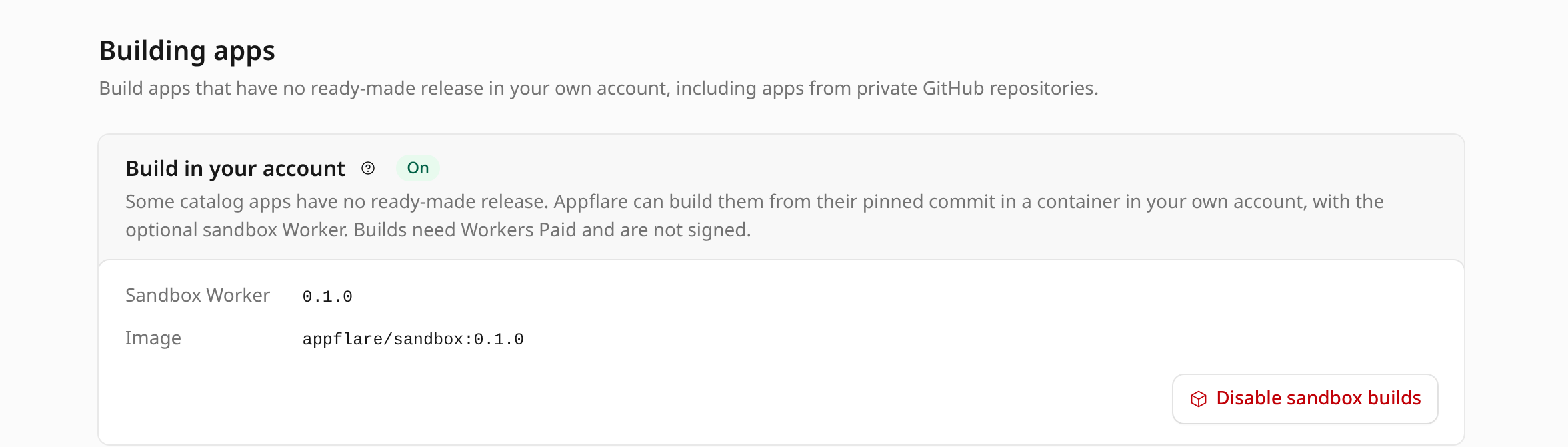
That work is done by an optional second Worker, appflare-sandbox. You enable it once
from the manager, in Settings > Building apps, and disable it there too.
It also builds repositories that are not in the catalog, and catalog apps at another
commit: see Install from a repository.
No sandbox tier apps in the catalog yet
The manager and the sandbox Worker support sandbox builds, but the catalog does not publish sandbox tier entries yet. Until it does, the catalog shows no app that is built this way.
What you need
- Workers Paid on the account (US$5 a month). The builds run in Cloudflare Containers, which the free plan does not include. The Build in your account section offers to enable them only once the manager has detected Workers Paid (see Workers Free or Workers Paid).
- R2 enabled on the account. The sandbox Worker keeps build outputs and logs in an R2 bucket. If you have never used R2, open R2 in the Cloudflare dashboard once to enable it.
- Containers: Edit on the manager's API token (Account > Containers > Edit, listed as optional for sandbox builds in the token template). The manager creates, updates and deletes the sandbox Worker's container applications with it. Editing the token in the Cloudflare dashboard keeps its value, so you do not need to paste it again. Keep the permission after enabling: updates and disabling need it too. Appflare connected with Cloudflare sign-in has it already.
Enable it
In Settings > Building apps, the Build in your account section shows Enable sandbox builds to admins. When R2 is off or the token lacks Containers: Edit, the card says so and the button stays disabled until the cause is fixed and the account is checked again (Check again in Settings > Your account > What this account can run).
Enabling runs as a job, so its log shows each step:
- It checks the account again: R2 enabled, and Containers usable with the token.
- It downloads the sandbox Worker release that belongs to this manager version from
github.com/appflare/appflare/releases(sandbox@<version>) and checks its signature the same way a self-update checks the manager's. Every file it uploads is checked against that signed manifest. - It creates the R2 bucket, uploads the sandbox Worker with its container classes,
and turns its
workers.devURL and preview URLs off. - It creates the container applications, running the release's image, and waits until Cloudflare has prepared their instances, which takes a minute or two. Prepared instances do not run: no container starts until a build asks for one.
- It connects the manager to the sandbox Worker (see below).
It creates:
| Resource | Name |
|---|---|
| Worker | appflare-sandbox, with no workers.dev URL and no routes |
| Container applications | For builds, appflare-sandbox-standard-1 (standard-1) and appflare-sandbox-standard-2 (standard-2); for the installers of self-deploying apps, appflare-sandbox-self-deploying-standard-1 and appflare-sandbox-self-deploying-standard-2 |
| R2 bucket | appflare-builds |
The containers run the image docker.io/mendylanda/appflare-sandbox:<version>, where the
version is the sandbox Worker's own. Each tag is published once and never changed.
The sandbox Worker has no public URL. It is built to be reached only by your manager, through a service binding.
Every step first looks at what is already there, so enabling is safe to run again. If
the job stops, what it made stays in place: enable again to continue from there, or
disable to remove it. A Worker named appflare-sandbox that is not an Appflare sandbox
Worker is never changed.
Enabling and the other sandbox actions start only while no other job runs, because they restart every container of the sandbox Worker.
Update it
Each manager version comes with a sandbox Worker version. After Appflare updates itself
to a version with a newer sandbox Worker, the card shows Sandbox Worker <version> is
available and an Update sandbox button. Updating runs the same job as enabling: it
uploads the new sandbox Worker, rolls its container applications out to the new image
and creates any the new version adds, then waits until they are ready.
Connect the manager
The manager reaches the sandbox Worker through a service binding named SANDBOX.
Enabling adds it at the end. A sandbox Worker that is already in the account but not
connected, such as one deployed before Appflare could enable it from its settings, can be
connected with Connect only on the card.
Connecting does not re-upload the manager. It creates a new version of the manager's
Worker from the one that is running, with only the SANDBOX binding added. It checks
that version's preview URL at /api/health like a self-update does, and only then
deploys it to all traffic. If the check fails, nothing changes, and connecting again
starts over from the running version. Connecting refuses while a self-update runs, and
when a newer version of the manager was uploaded but not deployed.
Every self-update after that keeps the binding while the appflare-sandbox Worker
exists, adds it when the Worker appeared since, and drops it with a warning in the job
log once the Worker is gone.
Disable it
Disable sandbox builds asks you to type appflare-sandbox. It is refused while any
app built or deployed in the sandbox Worker is still installed; uninstall those apps
first. It is also refused, before anything is deleted, when the manager could not be
disconnected at the end: while a gradual deployment of the manager is in progress, or
when a newer version of the manager was uploaded but not deployed.
The job deletes the sandbox Worker and its container applications, empties and deletes
the appflare-builds bucket, and last removes the SANDBOX binding from the manager (a
checked new version, as above), leaving the account as it was before. The binding goes
last because removing it deploys the manager, which the job itself runs on. The
GitHub access tokens are
secrets of the sandbox Worker, so they go with it; add them again after enabling
sandbox builds again.
If the job stops after the sandbox Worker is deleted, the manager keeps a binding to a Worker that no longer exists. Settings > Building apps then reads sandbox builds as off and says Appflare still has a binding to a deleted sandbox Worker. Disable sandbox builds finishes the job and removes the binding; Enable sandbox builds replaces it with one to the new sandbox Worker.
Install a sandbox tier app
A sandbox tier app shows Built in your account in the catalog. Its page shows the commit it is built from, the container size, and what one build costs. The install form asks you to confirm that cost, next to the Workers Paid confirmation. Without a connected sandbox Worker the form stays disabled and says why.
The install job then runs these steps before the usual install:
- check sandbox Worker: the binding exists and the sandbox Worker speaks this manager's protocol version.
- load catalog manifest: the entry's catalog manifest, published next to the catalog index, must match the digest in the index, name this app, be a sandbox tier entry, and pin the same commit.
- build in sandbox: one call to the sandbox Worker that returns when the build is done. While it runs, the job page shows the build's latest output, read from the sandbox Worker every two seconds. When it ends, the last 40 lines go into the job log. A build runs at most twice: once more if its container could not start, stopped, or the build took longer than 55 minutes. A failing command is not run again. A second run costs as much as the first.
- verify built manifest: see What you are trusting.
After that the job installs the build exactly as it installs a prebuilt artifact,
reading each file with a range request through the sandbox Worker. The app's page
says Built in your account from <commit> with image <image>, unsigned.
Updates of a sandbox tier app build the new version the same way, and ask you to confirm the cost first. Whether the new version can be checked on a preview URL is known only after the build. If the installed version already has no preview (it implements a Durable Object), the update asks you to accept that up front; otherwise you can tick update without that check in advance. If the build turns out to need a deploy without a preview check and you did not accept it, the update stops before anything changes and you can start it again. After a successful update the sandbox Worker keeps the builds of the new version and the one before it and deletes older ones. Uninstalling deletes all of the install's builds. A build made for review (from a repository or from source) that nobody installs, updates from or throws away is deleted after 7 days. A rollback returns to the snapshot's Worker version and its recorded provenance; it does not rebuild anything.
What a build does
Installing or updating a sandbox tier app asks the sandbox Worker to build that version. In a fresh container, the sandbox Worker:
- Clones the app's repository at the catalog's pinned commit and checks that the checkout is exactly that commit. If the tag has moved since the catalog pinned it, it fetches the pinned commit itself.
- Installs the dependencies from the lockfile with install scripts disabled.
- Packs the Worker with
@appflare/pack, the same packer catalog CI uses. The packer first runs the build command the catalog entry declares, if any, thenwrangler deploy --dry-runto bundle it. - Copies the artifact into the
appflare-buildsbucket, checks every file in it against the artifact's manifest, and deletes the container.
The manager then installs the artifact exactly as it installs a prebuilt one.
What you are trusting
- The pinned commit. Each sandbox tier entry pins an exact commit, and a catalog maintainer merges every change of it by hand. The sandbox Worker builds only that commit; a moved tag cannot change what is built.
- No install scripts, no credentials. Dependency install scripts never run. The
container holds no Cloudflare token or key of any kind, so the code it runs has
nothing to act on your account with. The build output reaches R2 through the
sandbox Worker's own binding, not with keys. A build needs the internet to fetch its
dependencies, so it can reach any host. The sandbox Worker refuses its HTTP and HTTPS
requests addressed to
api.cloudflare.com, but that only stops requests that name the API: a build could still reach it by IP address or through another server. What protects your account is that the build has no credential to send. - Unsigned output. A prebuilt artifact is signed by catalog CI. A sandbox build is
built in your account and is not signed. The manager accepts an unsigned
manifest.jsononly when it reads it through theSANDBOXbinding, and only when its sha256 is the digest the build reported, it names this app and version, it was built from the pinned commit, and it carries exactly the catalog manifest the catalog published for the entry. Every file is then checked against that manifest before it is uploaded. The app is shown as built in your account from its commit rather than as signed.
The app's own code is still third-party code, as with any app you install.
What it costs
Workers Paid includes some container usage each month: 25 GiB-hours of memory, 375 vCPU-minutes, and 200 GB-hours of disk. Beyond that, a build costs what its container uses while it runs:
| Container | Size | A 10-minute build |
|---|---|---|
standard-1 (default) | 1/2 vCPU, 4 GiB memory, 8 GB disk | about US$0.012 |
standard-2 (entries that ask for it) | 1 vCPU, 6 GiB memory, 12 GB disk | about US$0.022 |
With the included usage, about 35 ten-minute standard-1 builds a month cost nothing
extra. Most builds take less than ten minutes.
Nothing runs between builds. After enabling, the dashboard counts each application's instances as healthy: Cloudflare has prepared them, but none is assigned or running, and Cloudflare bills only containers that are actively running. A build starts one container and the sandbox Worker stops it as soon as the build ends (seen live: it was gone within 20 seconds). If stopping it fails, it stops on its own after 15 minutes without activity. Build outputs in R2 are small and usually stay within R2's free storage. See Cloudflare's Containers pricing for the current rates.
Self-deploying apps
Some apps do not deploy with wrangler at all: they ship their own installer, such as an Alchemy stack that creates several Workers, databases, buckets and a Cloudflare Access application in one run. Their catalog entries use the self-deploying tier. Appflare cannot pack them, so your sandbox Worker runs the app's own installer instead, at the commit the catalog pinned.
Install one
- Enable the sandbox Worker and connect the manager, as above.
- On the app's catalog page, read This app needs its own Cloudflare token and create that token with Create token. The installer deploys the app with it; the manager's own token is never used for the app.
- Fill in the install form: the token, the app's secrets and settings, and the cost
confirmation. There is no Worker name to choose: the installer names its Workers
after the install's stage,
appflare-and the last characters of the install's id (for exampleopen-seo-appflare-x0yzabcd), so several installs never collide.
The install job then:
- stores the token, and each of the app's secret values, as secrets on the sandbox
Worker (
APP_TOKEN_<install>andAPP_SECRET_<install>_<name>); - has the sandbox Worker check out the pinned commit, install its dependencies with install scripts disabled, run the entry's build command without credentials, and then run the installer's deploy command with the token, the account id, the app's settings and its secrets in its environment;
- reads back, with the app's token, the Workers the entry says the installer creates and everything they bind (D1 databases, KV namespaces, R2 buckets, queues, Vectorize indexes, Durable Object classes, Workflows), and lists them on the app's page as managed by the app's installer;
- checks the app at its Worker's workers.dev URL. Such apps usually sit behind Cloudflare Access, so any answer from the Worker itself, a redirect to the Access login included, counts as serving.
The job page shows the installer's output while it runs.
Update, rollback and uninstall
- Update runs the installer's deploy command again at the new pin. The installer compares what it deployed before with what the new version needs and changes only that. Appflare takes no snapshot.
- Rollback is not available. The installer changes the app in place, so there is no earlier version for Appflare to switch back to. Restore data with the app's own tools if an update goes wrong.
- Uninstall runs the installer's destroy command, which deletes everything the installer created, data included; nothing can be kept. Appflare then deletes the app's token and secrets from the sandbox Worker. Appflare never deletes the app's resources itself.
Each run of the installer costs about as much as a sandbox build of the same size; the install form and the update dialog show the estimate.
The app's token
The sandbox Worker holds the token for as long as the app is installed, because updates and uninstalls need it. If you rotate the token, or the sandbox Worker was deleted and enabled again (which removes its secrets), enter the token again under App token on the app's page before the next update or uninstall. An update also accepts a new token.
One change at a time. Every secret stored on or removed from the sandbox Worker deploys a new version of it, which restarts its containers and would stop a build or installer run in progress. So Appflare refuses to change those secrets (an install or update of a self-deploying app storing its token, an uninstall removing it, or entering the token again) while another job that runs in the sandbox Worker is queued or running; wait for it to finish, then try again. A run that was stopped anyway is retried in a fresh container.
How many apps fit. A Worker holds at most 128 environment variables and secrets. Each self-deploying install takes one for its token and one per app secret on the sandbox Worker, so the sandbox Worker has room for a few dozen such installs.
Before the installer runs, the sandbox Worker deletes any .env file in the app's
checkout (committed or written by its build): installers such as Alchemy read it before
their environment, and the settings Appflare hands them must win.
What the installer keeps in your account. Alchemy keeps its state in the account.
On an account that has never run an Alchemy deploy, the first deploy creates the
Secrets Store, two secrets in it (the state store's token and encryption key), and an
alchemy-state-store Worker with a workers.dev route, and uses a temporary preview
Worker to read the token back. That is why such an app's token needs Secrets Store
with Edit, not just Read. Every Alchemy app in the account shares the state store;
uninstalling one app leaves it in place.
Troubleshooting
Appflare is not connected to a sandbox Worker. Choose Enable sandbox builds in Settings > Building apps > Build in your account, or Connect only when the sandbox Worker is already there.
Appflare still has a binding to a deleted sandbox Worker. A disable stopped after it deleted the sandbox Worker. Choose Disable sandbox builds to finish it, which removes the binding, or Enable sandbox builds, which replaces it.
Updating Appflare stops with service binding SANDBOX points at "(no service)". A
disable in Appflare 0.3.1 or earlier deleted the sandbox Worker and left the manager's
binding to it, and those versions refuse to update with it. Remove it once in the
Cloudflare dashboard: open Workers & Pages, your Appflare Worker, Settings >
Bindings, and delete SANDBOX. Then update Appflare. Later versions remove such a
binding themselves.
The sandbox Worker speaks another protocol. The manager and the sandbox Worker are from releases that do not match. Update whichever is older: Update sandbox in Settings > Building apps > Build in your account, or update Appflare itself in Settings > Updates > Appflare version.
Sandbox builds need Workers Paid. The account is on the free plan. Upgrade it under Workers & Pages > Plans in the dashboard, select Check again under What this account can run in Settings > Your account, and enable sandbox builds.
R2 is not enabled on this account. Open R2 in the dashboard once, select Check again, and enable sandbox builds again.
The token lacks Containers: Edit. Edit Appflare's token in the dashboard, add Account > Containers > Edit, select Check again, and enable sandbox builds again.
The container applications are not ready yet. Their containers took longer to start than the job waits (Docker Hub can be slow to serve the image). Enable sandbox builds again: the job finds everything it made and only waits again.
A build fails in the install step. The app's lockfile does not match its
package.json at the pinned commit, or a dependency needs its install script. The
job log shows the package manager's output; report it on the catalog entry.
The sandbox Worker does not hold the app's token. A self-deploying app's update or uninstall stops before its installer runs. Enter the token again under App token on the app's page, then retry.
The installer finished, but a Worker is missing. The catalog entry's list of Workers does not match what the installer deploys at that commit; report it on the catalog entry.
The first build takes longer. Cloudflare pulls the sandbox Worker image from Docker Hub the first time a container starts in a location. Later builds start faster.